Skip to main content
If the calendar frame is unresponsive, how can I clear its data?
If the calendar frame is unresponsive and you want to clear the data, please refer to the information below.
1. On the eCalendar APP
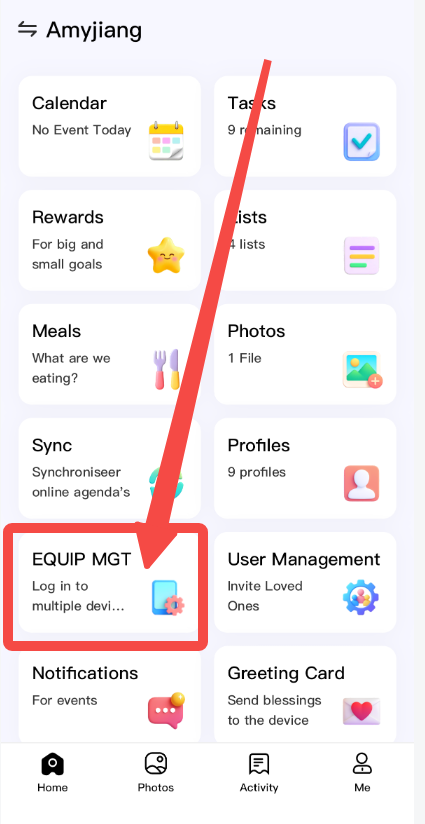
If you are the main account holder, you can find the "EQUIP MGT" option within the eCalendar app, as shown in the image below.
And you will find your device information. Please choose the red button "unbind device".
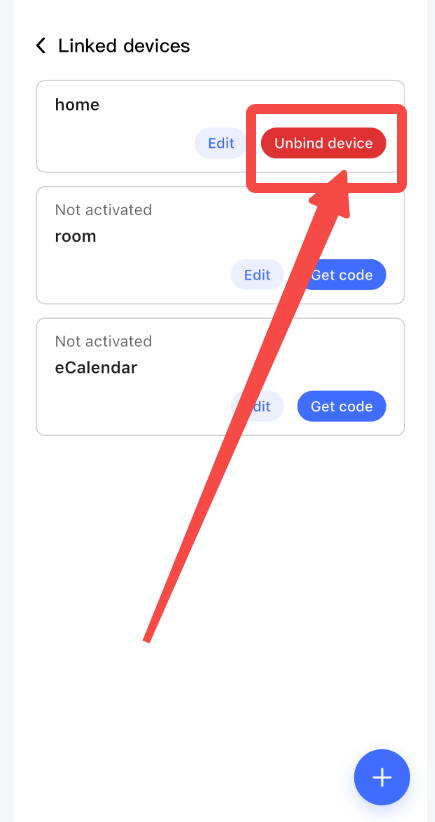
Finally, the frame will exit your account and clear all information.
Our contact way
Phone Support: (888) 811-1140(US)
Hours: Monday – Friday, 9:00 AM – 5:00 PM
Articles in this section
See more
Was this article helpful?
0 out of 0 found this helpful
Have more questions?
Submit a request
Comments
0 comments
Please sign in to leave a comment.