Skip to main content
How do I delete my eCalendar registered account?
About how to delete my eCalendar registered account, please refer to the information below.
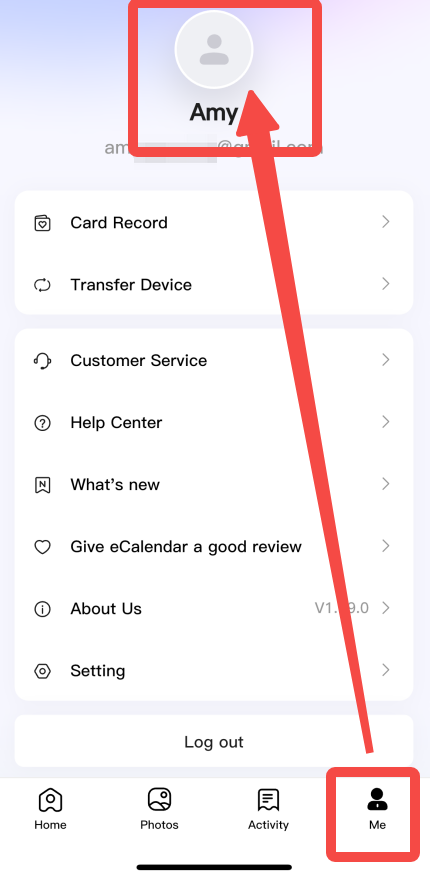
1. Open the eCalendar APP>Me
2. Tap the character's avatar
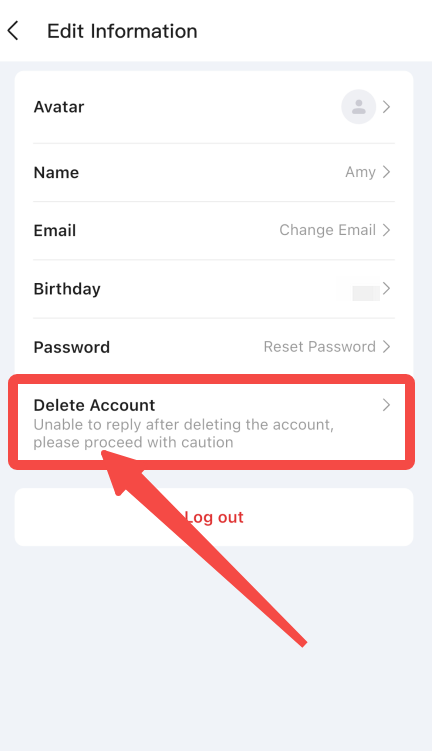
3. Click "Delete Account" to close your account; all your data will be permanently removed.
Our contact way
Phone Support: (888) 811-1140(US)
Hours: Monday – Friday, 9:00 AM – 5:00 PM
Articles in this section
See more
Was this article helpful?
0 out of 0 found this helpful
Have more questions?
Submit a request
Comments
0 comments
Please sign in to leave a comment.